
Built in Amsterdam for European hospitality
Shifts, labour cost and daily sales in one place — available today.
Table ordering & payment: pilot in preparation
Staff clock in on their own phone or a shared one in the venue, you plan the week from the availability they send, and every day closes with a cash count that shows any difference. Table ordering and payment (Order & Pay): a pilot in preparation for venues whose till has no QR ordering, planned to start in December 2026.
Available now and in development are marked separately on this page. Data stored in the EU (Ireland).
Manseki — 満席 “full house”
Why this and not a QR-only app
In developmentOrders and labour cost, on the same timeline.
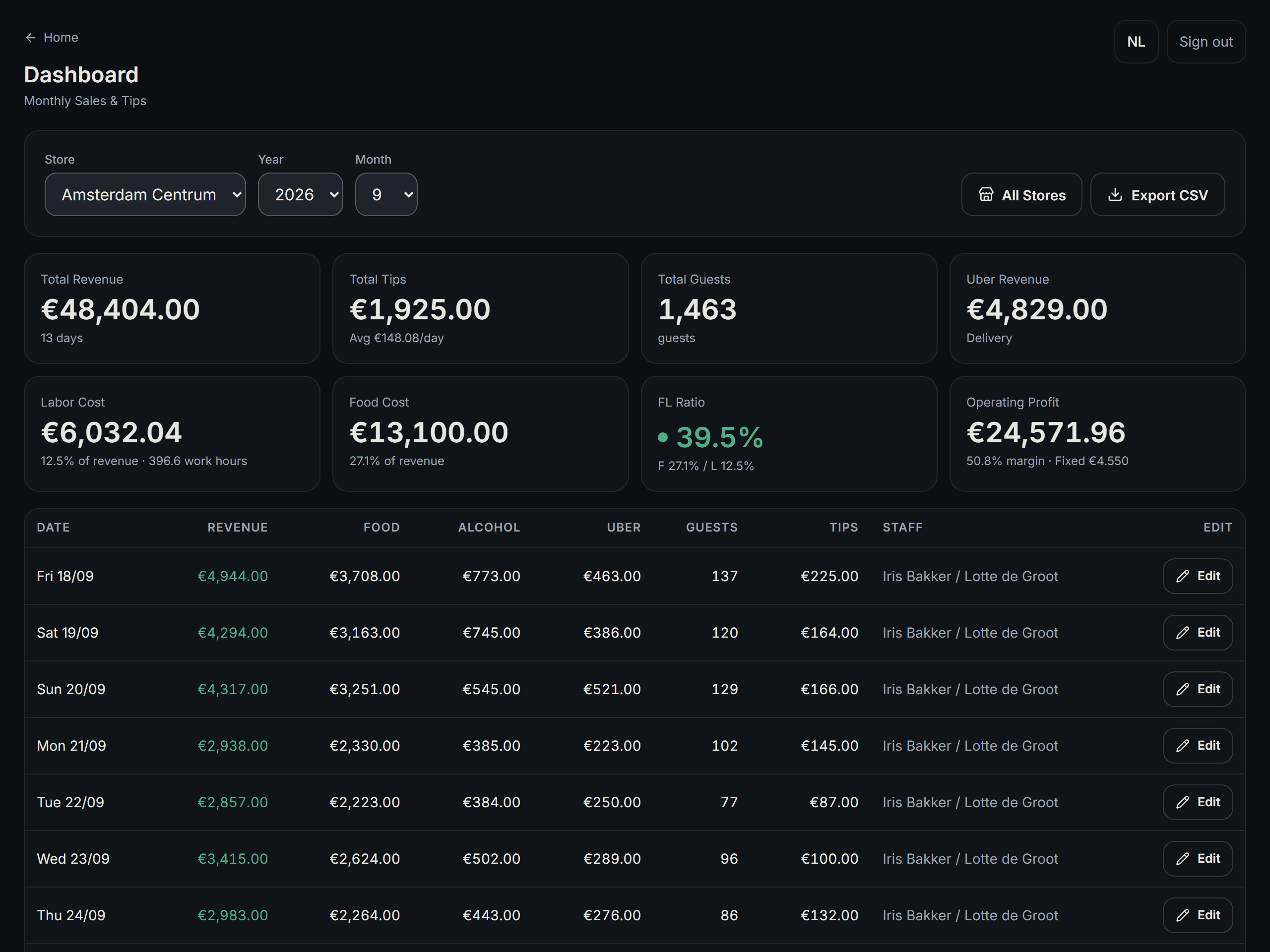
QR ordering apps tell you what was sold. Rosters tell you who was in. The plan is to keep both in one place, so the two can sit side by side per hour and you can decide where the next shift should start. This is what we are building; it is not available yet.
- In developmentRevenue per hour against staff on the floor, per venue
- In developmentPlan the roster against the hours that actually sell
- In developmentFood cost and labour cost (FL) from the same numbers
Available today: hours worked to the minute and revenue per day. If you import a CSV or Excel export from your current till, you can also see sales per half hour next to labour hours, one day at a time. Doing this with table orders needs table ordering (Order & Pay, pilot in preparation).
We do not publish a percentage saved. We will measure it with pilot venues first and say where the number came from.
Live demo
Open the real product, right now.
No form, no call, no waiting. A venue with two weeks of data is ready for you, and you can click everything.
- — Two weeks of shifts, hours and register closes already filled in
- — Manager view — the same screens your own venue would have
- — Nothing to install, nothing to cancel
Sample data. The demo is reset from time to time.
Who it is for
Japanese and Asian restaurants in Europe.
Ramen, teishoku, izakaya, sushi and other Asian kitchens. The parts that usually break in generic systems are the parts we started with.
- Pilot in preparation (Order & Pay): menus in several languages, so a guest who reads none of them can still order
- Pilot in preparation (Order & Pay): toppings, extras and second rounds, without restarting the order
- Staff who speak different languages — everyone picks their own
Running in restaurants today.
These are in the product, and you can try them as they are in the demo environment.
Time-clock and attendance
Staff clock in, take breaks and clock out on their own phone or a shared one in the venue. The location is checked against the venue and clock-ins outside the area are marked. Missed clock-outs are flagged; staff can ask for a correction, and the manager’s decision is kept.
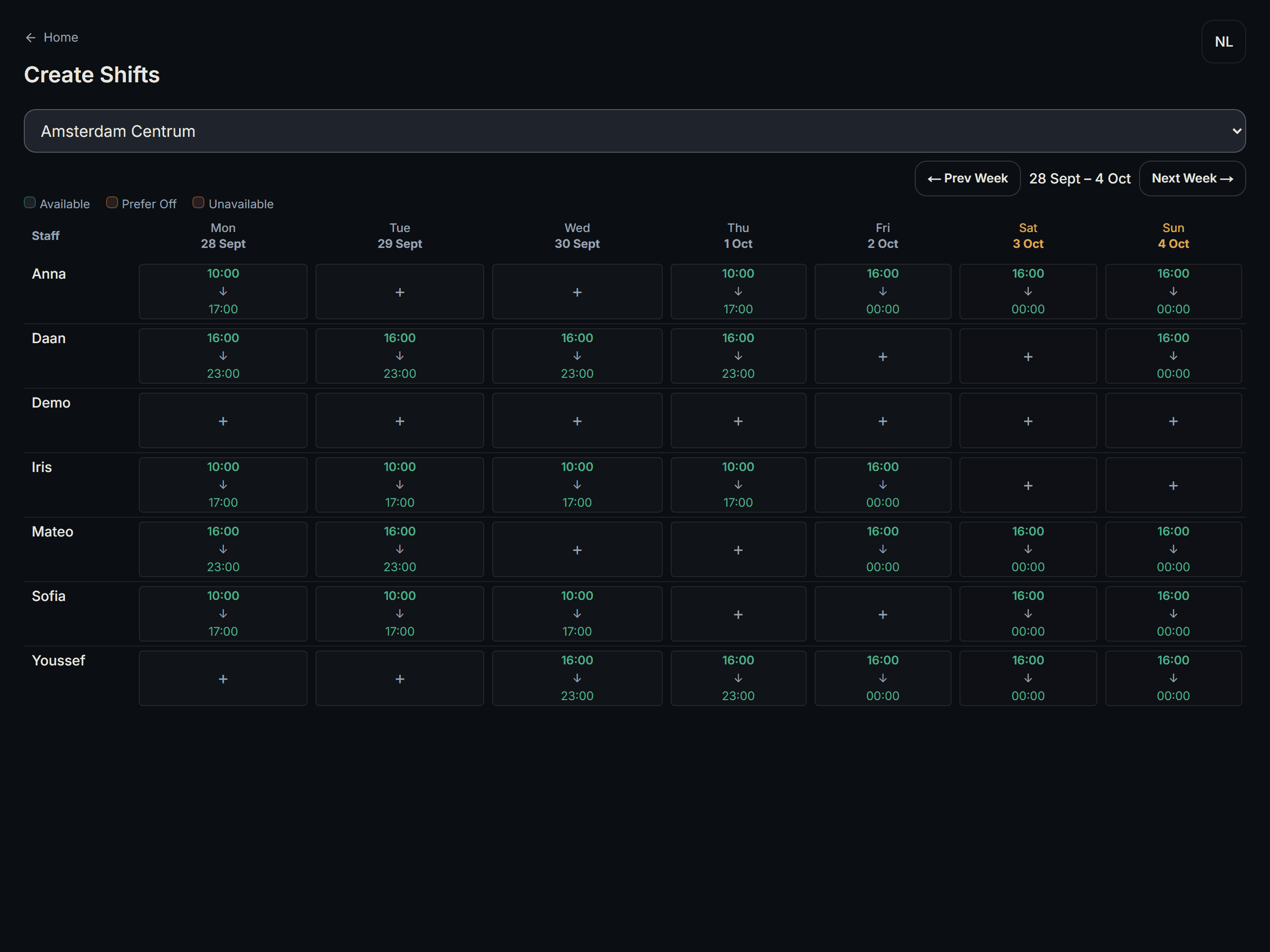
Shift scheduling
Staff send their availability before a deadline you set; late requests are marked. Plan the week per venue, copy last week in one go, and see visa or residence permit expiry warnings on the planner.
Staff records
Roles, hourly rates, visa or residence permit type and expiry date in one place. When the expiry is 30 days away or less, a warning shows on the staff list and the shift planner.
Daily register close
One form per venue per day: cash counted by denomination, card and PIN, Uber Eats and tips. The difference is worked out and shown, and the form can be pre-filled from your till import.
FL analysis
Food cost and labour cost against revenue, per venue and per month — the number you actually steer on. Included in Pro.
Tip distribution
Split a day’s tips per venue by the hours each person worked, with a per-person breakdown.
Sales import (CSV, Excel, PDF, photo)
Import a CSV or Excel export from your current till and see sales per half hour next to the hours your team worked, one day at a time. One file can cover several days; each file is for one venue. Till reports as a PDF or photo are read by AI, and you check the numbers before they are saved (AI reading is switched on per company after a set-up step).
Menu analysis
From item-level till sales: units sold and revenue per dish, grouped A, B and C by revenue. With your recipe costs, Pro also shows food cost % and gross profit.
Ingredient stock and count differences
The theoretical stock of each ingredient from what you sold and your recipes, and the difference with what you counted, in a weekly summary.
On the phone
Made for the phone in your team’s pocket.
Staff clock in, send their availability and close the register from their own phone or a shared one in the venue — no app to install.
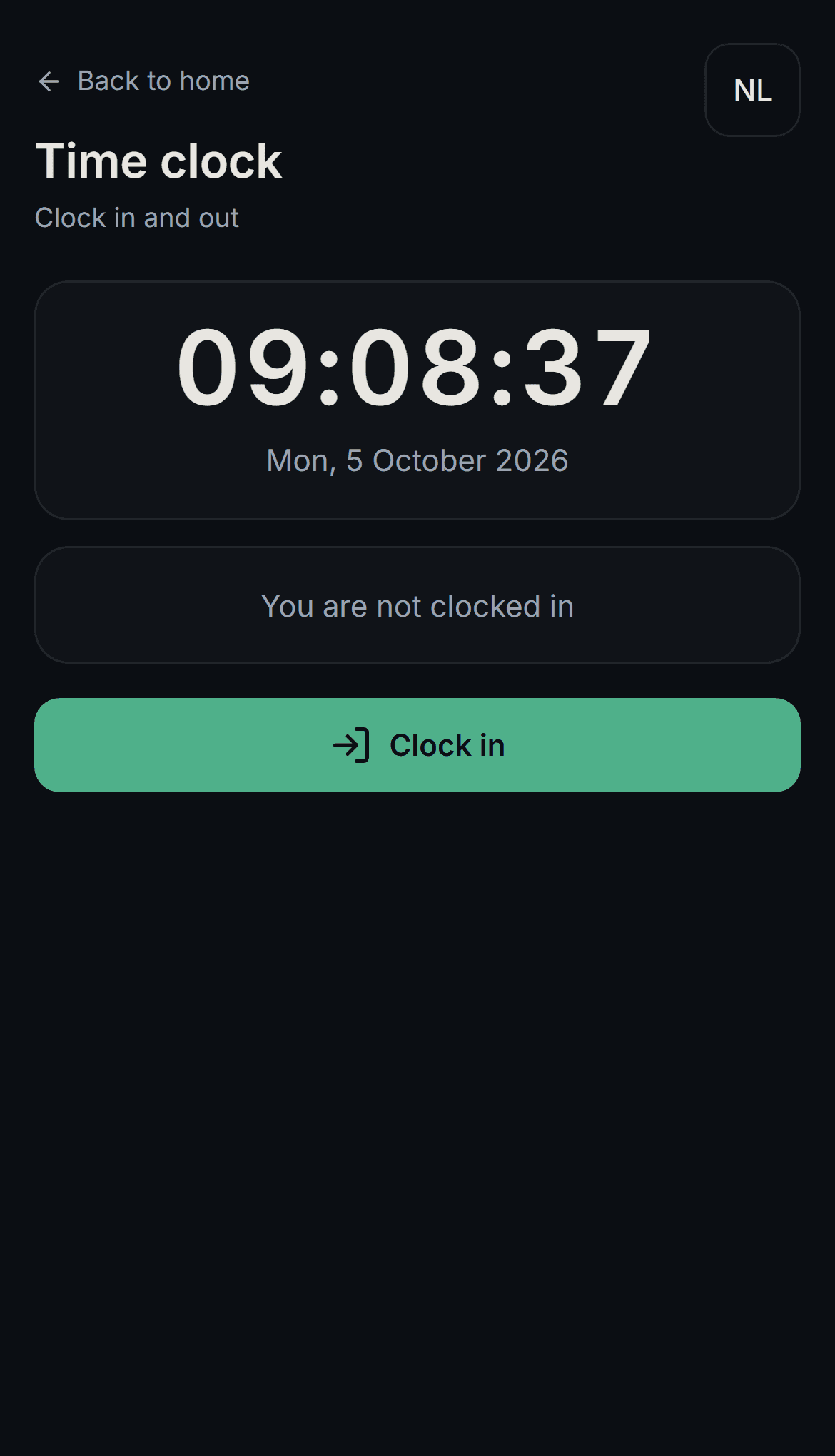
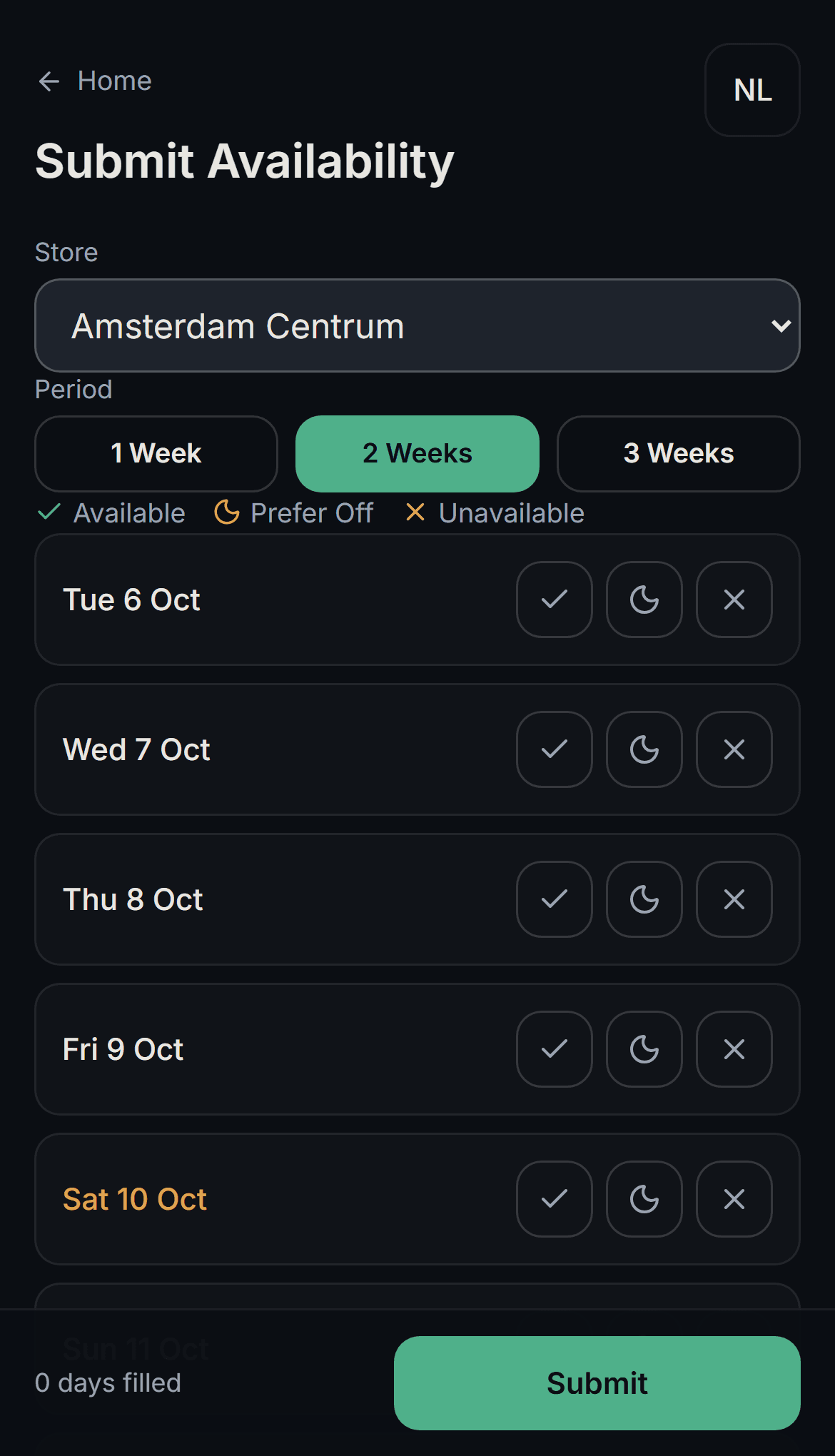
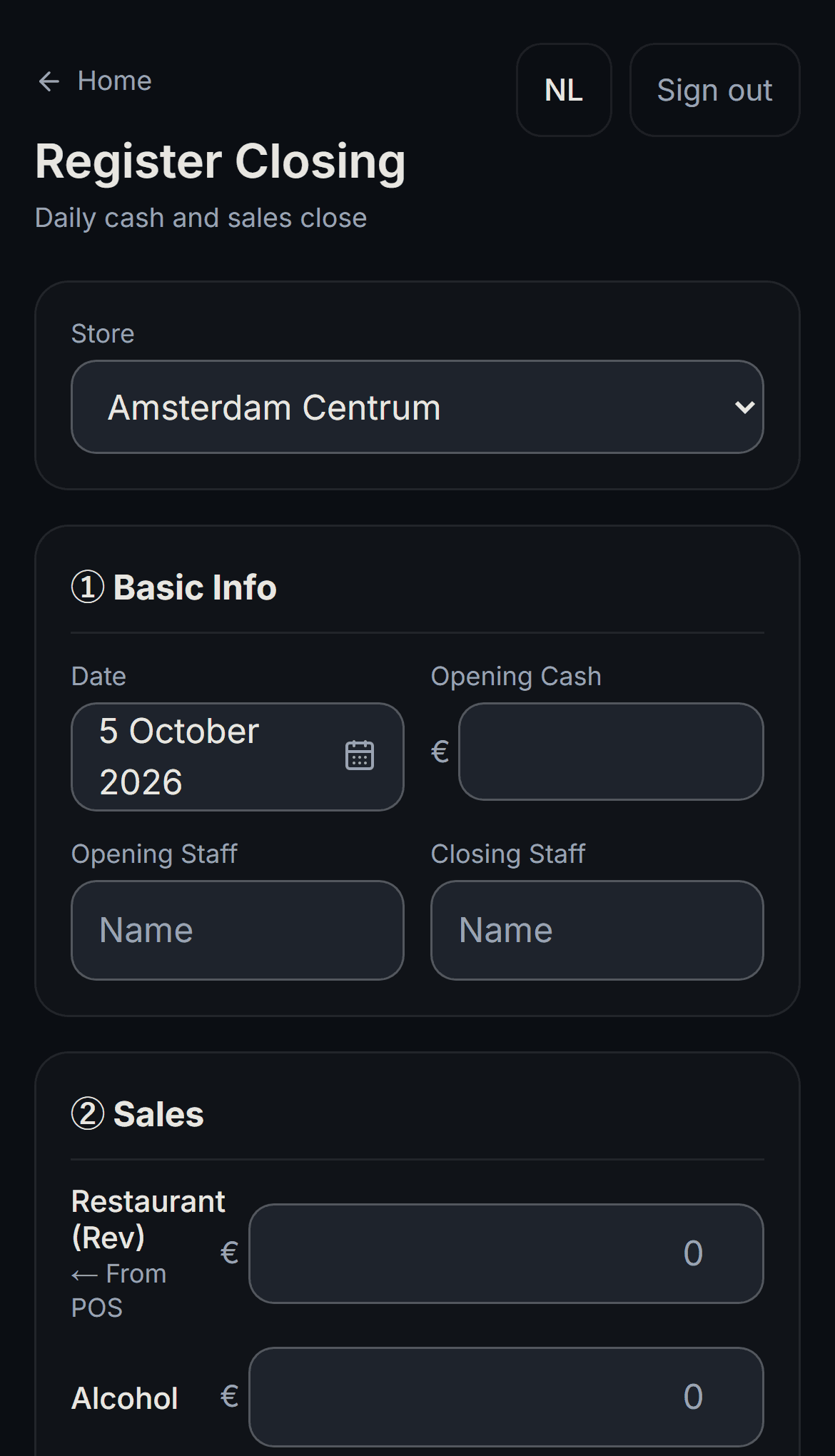
Table ordering and paying at the table.
No venue is using this yet. The pilot is being prepared and is planned to start in December 2026. When it becomes generally available has not been decided; we will say so on this page.
Order by QR at the table
The guest scans the code on the table and orders from their own phone — no app to install.
Pay at the table
Card, Apple Pay, Google Pay and iDEAL / Wero, at the table instead of at the till.
Split the bill and tip
Guests split the bill between them and add a tip, without holding up the floor.
Kitchen display (KDS)
Orders land on a screen in the kitchen in the order they were placed.
Digital receipt
The receipt goes to the guest’s phone — no printer roll, no lost paper.
Live revenue
Sales as they happen, next to the staff currently on the floor.
On the guest’s phone
Call a member of staff
Guests call staff from the screen and pick what it is for, so the floor team knows before they walk over.
Ask for the bill
Guests check the itemised bill, ask for it and can pay straight away on their phone.
Zoom in to read
Zooming is never blocked. Forgot your reading glasses? Spread two fingers and read the menu.
A locked QR on every table
Each table QR is locked: changing the number does not open another table. If you are worried, make a new QR in your own screen and the old one stops working straight away.
Data
In development · timing after the pilotRun the restaurant on data (in development — we set the timing after the Order & Pay pilot)
Once table ordering and the kitchen display are live, every order carries a time, a table and a dish. These are the analyses we are building on top of that. None of them is available yet.
Serving-time measurement
The time from order to serving, per dish and per time of day, taken from the kitchen display records.
Seat utilisation
Turnover per table, and sales per seat and per hour.
Spotting unusual sellers
A notification when a dish sells more or less than it usually does at your venue.
Next to the labour cost
Sales per hour, serving times and the staff on shift, side by side on the same screen as the labour cost.
Because Manseki holds the order data itself, item-level analysis is not limited by an external till’s restrictions.
Reservations
In development · planned for the second half of 2027Reservations and your own venue page (second half of 2027, in development)
After table ordering, we plan reservations and an automatically generated venue page. None of this is available yet; it is included in Pro when it arrives.
Taking reservations
Time slots you set, a confirmation email to the guest, and the number of reservations shown on the shift screen.
Live availability
“Seats available / busy / full” from the live table status, with an estimated wait. You choose whether and how much to show.
Your venue page
A simple page for your venue, generated from your menu and opening hours, with the reservation form on it.
Planned for the second half of 2027. If the timing changes, we will say so on this page.
How Order & Pay works (pilot in preparation)
From the QR code to the day’s revenue.
Steps 1 to 6 are Order & Pay, a pilot in preparation (planned to start in December 2026); step 7 exists today.
- 01
Scan
The guest scans the QR on the table.
- 02
Order
They order in their own language, with toppings and extras.
- 03
To the kitchen
The order appears on the kitchen screen straight away.
- 04
Prepare and serve
Your team cooks and runs the dish out.
- 05
Eat and order again
A second round goes on the same table order.
- 06
Pay at the table
They pay on their phone and split it if they want.
- 07
Into the day’s revenue
The amount lands in the daily figures — no re-typing at closing.
What we commit to
Three things we will not change later.
- No hidden fee for your guests
- Guests never pay a service fee to use the ordering or payment screen.
- Your money goes to your account
- Payments are settled to the venue’s own bank account, not held by us.
- Your data stays in the EU
- Everything is stored on servers in the European Union (Ireland).
Pricing
Pricing, stated openly.
Per venue, per month, excluding VAT. Starter and Pro are available now; Order & Pay is a pilot in preparation (planned to start in December 2026).
Starter and Pro: sign up by 31 December 2027 and the first 3 months are free.
The 3 free months are not counted in orders or uses: nothing stops and nothing extra is charged on a busy weekend. After that you pay a fixed monthly price per venue. The 3 free months cover only the monthly price of Starter and Pro. Order & Pay (€39 per venue per month plus 0.4% of payments, capped at €100 per month) is not included in the free period.
Manseki Starter
Available nowOne venue with a small team — available now
€29 per venue / month
- 1 venue, up to 15 staff
- Time-clock, attendance and shift scheduling
- Staff records with permit expiry
- Daily register close and tip distribution
- Sales import (CSV, Excel, PDF, photo)
Not included
- Cost rates (food and labour cost %)
- Profit & loss and FL analysis
- All-venues overview
Manseki Pro
Available nowStaff, shifts and the numbers, for one or more venues — available now
€79 per venue / month
Founding-customer price: after the 3 free months, €59 per venue per month for 24 months, then €79.
- Unlimited staff
- Multiple venues, with the all-venues overview
- Everything in Starter
- FL analysis, cost rates and profit & loss
- Export for your accountant
Order & Pay
Pilot in preparation (planned to start in December 2026)An add-on for venues whose till has no QR ordering
€39 per venue / month
Plus 0.4% of payments through the system, capped at €100 per venue per month. When you refund a guest, we also return our fee (0.4%) in proportion to the refund. Your payment provider’s fee is not returned on a refund.
- Order by QR at the table
- Pay at the table, split the bill and tip
- Kitchen display and digital receipts
- Menu in several languages
- Revenue recorded automatically
Your payment provider’s own fees are separate.
Order & Pay is a pilot in preparation (planned to start in December 2026). When it becomes generally available has not been decided; if its price or what it includes changes, we will say so here.
Prices exclude VAT.
Pilot
Three venues in the Netherlands, from January 2027.
We are looking for three venues to run table ordering and payment first. You get the product early and a direct line to the people building it; we get honest feedback and the measurements we are not willing to invent.
First three venues. We will close this section here when they are taken.
Questions
What people ask first.
What can I use today?
Everything in the “Available now” section: time-clock and attendance, shift scheduling, staff records, daily register close, FL analysis, tip distribution, the sales import (CSV, Excel, PDF, photo), menu analysis and ingredient stock counts. Table ordering and payment are not live yet.
When does table ordering arrive?
The pilot is being prepared: it is planned to start at a pop-up in December 2026, then continue with pilot venues in the Netherlands. Whether and when it becomes generally available will be decided after the pilot. We will not put a date on this page that we are not confident about.
What do I need to get started?
For what is available today: owners and managers use their own computer or phone. Staff use their own phone or a shared device in the venue — we never require personal phones. Clocking in needs location permission. Supported: iOS/iPadOS 16.4+, Chrome or Edge 111+, Firefox 128+, Safari 16.4+. For Order & Pay (pilot in preparation) you will also need a venue-owned phone or tablet for staff orders, a tablet or screen of 10 inches or more for the kitchen, a Stripe account in the venue’s name and, from spring 2027, a Stripe-compatible card terminal (we tell you which model after you sign up). We recommend venue Wi-Fi plus a backup mobile connection. We do not sell or lend devices.
What does it cost?
Manseki Starter is €29 per venue per month: 1 venue and up to 15 staff, without cost rates, profit & loss, FL analysis or the all-venues overview. Manseki Pro is €79 per venue per month with unlimited staff, multiple venues and all of the analysis; founding customers pay €59 per month for 24 months after the 3 free months, then €79. Order & Pay (pilot in preparation) is €39 per venue per month plus 0.4% of the amount paid through the system, capped at €100 per venue per month. All prices exclude VAT. Sign up by 31 December 2027 and the first 3 months are free.
Does it connect to my till?
Today, sales come in through a CSV or Excel export from your current till; till reports as a PDF or photo can be read too. One file can cover several days; each file is for one venue.
Do my guests pay a fee?
No. Guests never pay a service fee for ordering or paying, and the money is settled to your own bank account.
Where is our data stored?
On servers in the European Union (Ireland). We provide a Data Processing Agreement.
Which languages does it support?
English, Dutch and Japanese. Each person picks their own, so a kitchen team does not have to share one.
Who is behind Manseki?
Create Entrance B.V., a company registered in Amstelveen, the Netherlands. We build and run Manseki ourselves.
Start with your first venue.
Tell us about your restaurant. We create the account and reply by email — there is no call to book.
Or email us at hello@manseki.app